
Paradise 8 Casino South Africa operates through browser-based mobile technology — no downloads required from App Store or Google Play. The platform adapts to Android and iOS devices automatically, delivering instant access to slots, live dealers, table games, and sports betting markets. Your phone transforms into a complete casino experience within seconds.
Basically you just visit paradise8.co.za from Chrome, Safari, or any modern browser. Add a shortcut to your home screen and boom — it behaves like a native app but skips the storage bloat. I mean, who wants another 150MB installation eating phone memory?
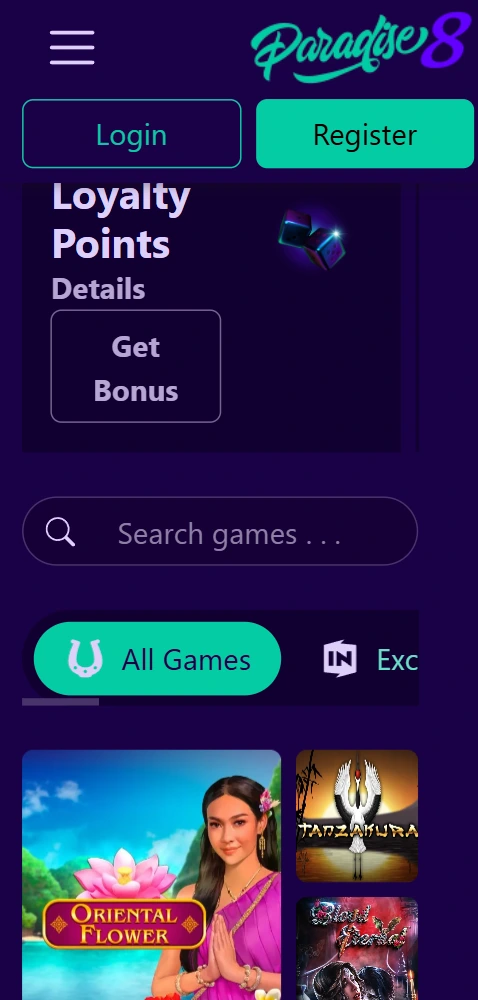
The browser-based approach eliminates download hassles while maintaining full functionality. Players access their accounts, deposit funds, place bets, spin slots, join live tables — everything available on desktop works on mobile. And the interface responds to touch gestures; swipe through game libraries, tap to select slots, pinch to zoom on sports markets.
Connection stability matters more than device specs here. A decent 4G signal or WiFi keeps gameplay smooth; the platform loads assets efficiently to minimize data consumption. Battery drain stays reasonable compared to resource-heavy native applications.
No App Store searches or Google Play downloads — visit site, login, play within 30 seconds from any smartphone or tablet.
Browser cache uses roughly 5-10MB versus 100-200MB for typical casino apps, preserving phone storage for photos and videos.
Platform improvements deploy server-side — you always access the latest version without manual app updates or reinstallations.
Complete catalog available — 180+ slots, live dealer tables, sports betting, crash games, all optimized for touch controls.
Ozow, Zapper, card deposits work seamlessly on mobile — same payment methods as desktop without limitations.
SSL encryption protects mobile connections; biometric login options available through browser security features on supported devices.
Setting up the mobile shortcut takes literally less than a minute. I've done this on my Samsung and my girlfriend's iPhone — both work identically well, just slightly different button locations.
Open Chrome (or your preferred browser that supports PWA). Navigate to paradise8.co.za and login to your account. Tap the three-dot menu icon in the top-right corner. Select "Add to Home screen" from the dropdown options. Name it whatever you want — I just left it as "Paradise 8" — then tap Add. The icon appears on your home screen alongside your other apps.
Minimum requirements for Android? Version 8.0 or later with at least 2GB RAM. Most phones from the last five years meet this easily.
Launch Safari browser (this works best on iOS for PWA functionality). Visit paradise8.co.za and sign into your account. Tap the Share button at the bottom of the screen. Scroll down and select "Add to Home Screen" option. Confirm the name and tap Add in the top-right corner.
You'll need iOS 13 or newer — any iPhone from iPhone 6S onwards supports this. iPads work too, though honestly the larger screen feels a bit excessive for slots; better suited for sports betting where you analyze multiple markets simultaneously.
The mobile version sacrifices zero functionality but optimizes interface elements for smaller screens. Game thumbnails resize appropriately, navigation menus collapse into hamburger format, bet slips stack vertically rather than sidebar positioning. Graphics quality adjusts based on connection speed and screen resolution.
Desktop excels for multi-table live casino sessions or building complex sports accumulators across numerous markets. Mobile dominates for quick slots sessions during commutes, checking live scores, placing in-play bets on PSL matches while watching at the pub. Both sync account balances, bonus progress, loyalty points in real-time.
Larger screens for simultaneous games, detailed statistics viewing, multi-market bet building, keyboard shortcuts for rapid navigation.
Portability for anywhere betting, touch-optimized controls, biometric security, push notifications for promotions, one-handed operation.
Switch between devices freely — balances, pending bets, bonuses, game history, preferences all remain consistent across platforms.
Honestly? Very few. The lack of a native app means no push notifications for score updates or promo alerts unless you enable browser notifications. Some older Android devices (pre-2018 models) might experience occasional lag on graphics-intensive live dealer games. And poor network coverage obviously impacts performance more than desktop wired connections.
Withdrawal processes remain identical — same timeframes, same limits, same KYC requirements. You can't avoid verification by switching to mobile; it's the same account system. Battery consumption during extended sessions (2+ hours continuous play) drains faster than browsing or video streaming, so keep a charger handy for marathon slots sessions.
No downloads required — the platform runs through your mobile browser, whether Chrome on Android or Safari on iOS, with optional home screen shortcut.
Data consumption varies by game type; slots use 5-15MB per hour, live dealer streams consume 50-100MB hourly, sports betting typically under 5MB per session.
All desktop payment options work on mobile including Ozow instant EFT, Zapper, Capitec Bank transfers, card deposits, and cryptocurrency transactions.
Bonuses apply identically across desktop and mobile — wagering requirements, eligible games, timeframes remain consistent regardless of access device.











Paradise 8 Casino South Africa functions as an online gambling operator under SSC Entertainment N.V., a duly registered entity holding license #8048/JAZ issued by the Curacao Gaming Authority. All operations comply with jurisdictional requirements for fair gaming and player security. International inquiries: (+1) 718 732 0154
© 2026 Paradise 8 Casino South Africa. All rights reserved.